
Vibe coding is trending right now—are you heavily using various AI coding CLI tools like Claude Code, Gemini CLI, or OpenCode? They’re great, but if you want to switch API providers or change to a backup model due to rate limits, it’s a real hassle.
CC Switch is aopen-source unified management and visualization platformbuilt specifically for AI coding tools. Think of it as a “provider switcher + configuration panel + MCP/Skills manager” for tools like Claude Code, Codex, and Gemini CLI.
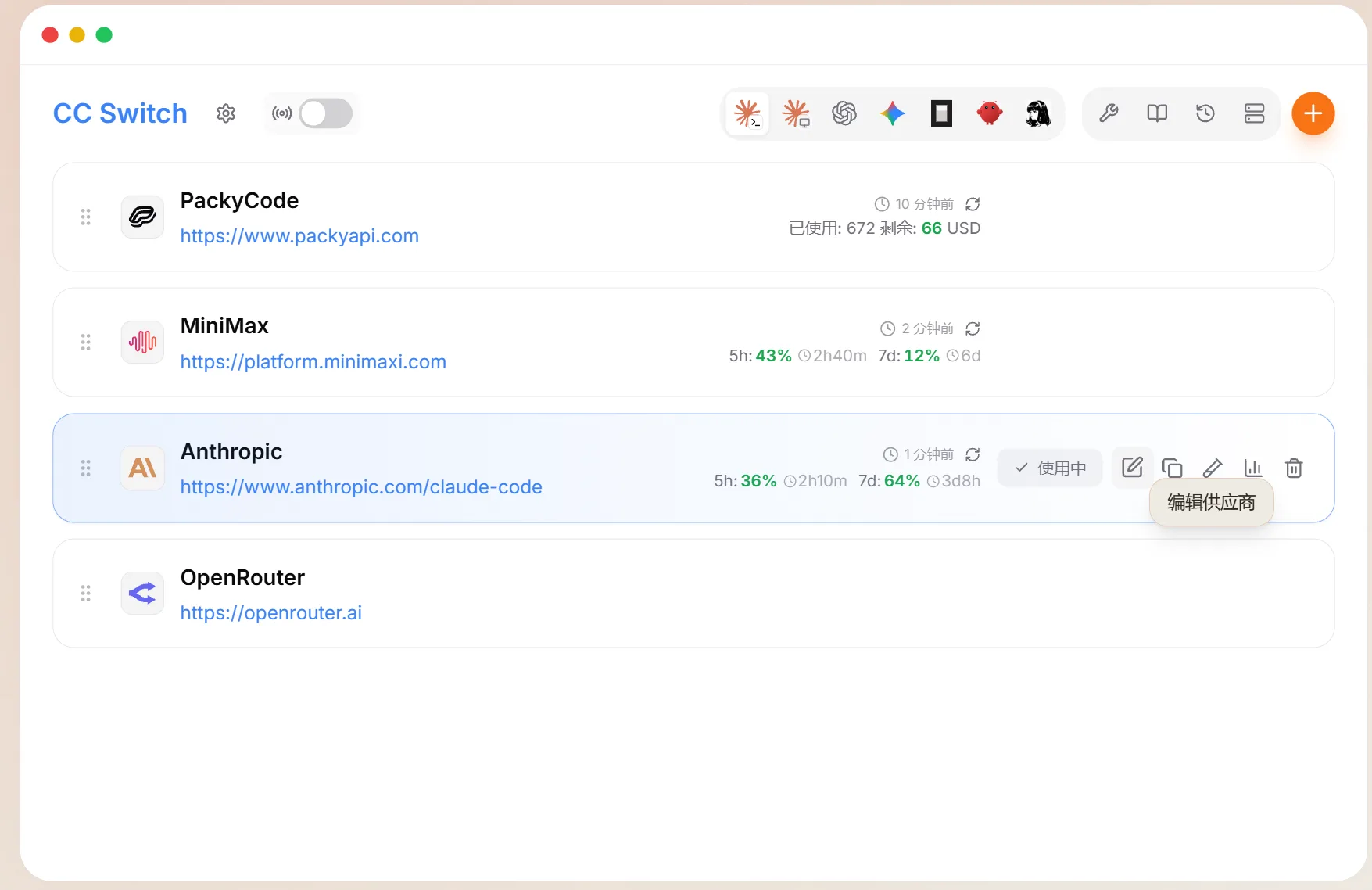
Features
Based on actual usage frequency, here are the features that are truly useful:
1. Unified Multi-App Management
Manage Claude Code, Claude Desktop, Codex, Gemini CLI, OpenCode, OpenClaw, and Hermes Agent all from a single interface. Configure your API once, and all connected apps sync automatically.
2. Provider Management (Most Used Feature)
Includes 50+ built-in provider presets, covering official APIs from Anthropic, OpenAI, and Google, as well as directly accessible domestic services like SiliconFlow, DeepSeek, Zhipu GLM, MiniMax, Kimi, and PackyCode. Just enter your API Key for one-click import—no need to manually construct Base URLs.
3. Local Routing + Protocol Translation (Hardcore Feature)
This is what sets CC Switch apart from standard “config switchers.” Starting from v3.16.0, it supports protocol translation between the OpenAI Responses API and Chat Completions API.
What does this mean? Codex natively only supports the Responses API, but most domestic providers (DeepSeek, Kimi, GLM, SiliconFlow) offer the Chat Completions interface. Previously, changing the base_url directly would result in a 404 or 400 error. Now, CC Switch runs a local proxy at 127.0.0.1:15721 thattranslates incoming requests into a format the target provider understands, and translates the response back into a format Codex recognizes—seamlessly.
⚠️ This means you can use DeepSeek in Codex, or GPT in Claude Code—models and apps are decoupled.
4. Automatic Failover + Circuit Breaker
Automatically switches to a backup provider if the primary one goes down, and triggers a circuit breaker after N consecutive failures to prevent cascading issues. For those of us who rely on AI as a core productivity tool, this is more important than anything else.
5. Unified MCP / Prompts / Skills Management
Configure an MCP Server once and sync it across Claude Code, Codex, Gemini CLI, and OpenClaw. Skills support one-click installation from GitHub repositories and can be toggled per app.
6. Usage and Cost Tracking
Token consumption, request counts, cache hit rates, and cost breakdowns by model and provider—this information is especially critical when switching between multiple AI coding CLIs.
7. Cloud Sync
Point the config directory to Dropbox, OneDrive, iCloud, or WebDAV so you don’t lose your configurations when switching computers.
Tutorial
If you’re a first-time user, follow this flow to get up and running in 5 minutes:
Step 1: Download and Install
Download the appropriate installer from the GitHub Releases page:
- Windows: Choose
.msi(supports auto-update) - macOS:
brew tap farion1231/ccswitch && brew install --cask cc-switchis recommended - Linux: Choose
.deb,.rpm, or AppImage depending on your distribution
⚠️ On Windows, SmartScreen might block the installation; just click “More info → Run anyway.” On macOS, you’ll need to allow it under “Privacy & Security” on first launch.
Step 2: Open Settings and Enable Plugin Integration
Gear icon (top left) → General → Turn on “Apply to Claude Code / Codex / Gemini CLI plugins.” If you skip this step, provider switching won’t take effect later.
Step 3: Add a Provider
Top right of the main interface: + → Select a preset (e.g., “DeepSeek,” “Zhipu GLM,” “SiliconFlow”) → Enter API Key → Save.
Step 4: Enable
Click “Enable” in the provider list. It takes effect immediately in Claude Code, while Codex/Gemini might require a terminal restart.
Step 5 (Optional): Enable Routing
Settings → Advanced → Routing Service → Turn on the routing toggle for the apps you need. Enabling this unlocks failover, usage tracking, and hot-switching.
Verification is simple: run claude or codex in your terminal, send a test request, and if you get a reply, you’re good to go.