
dsq is a SQL command-line analysis tool that supports local files, allowing you to run SQL queries on data files, making it easy to query, analyze, and process various files.
Supports multiple data formats, including JSON, CSV, Excel, Parquet, etc.
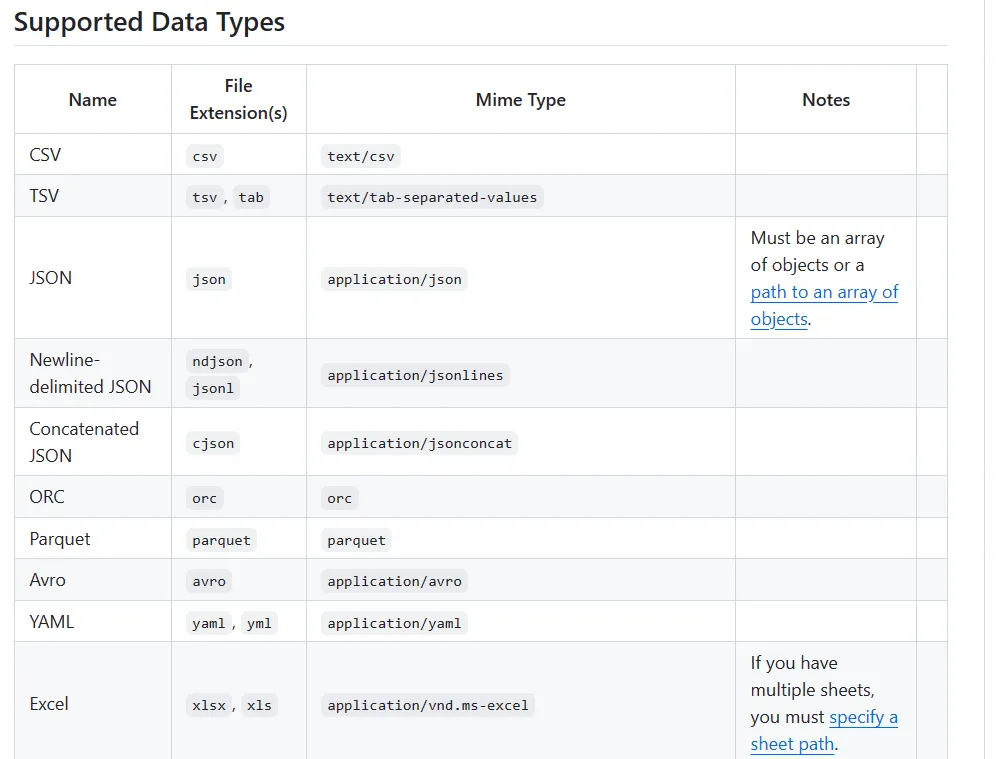
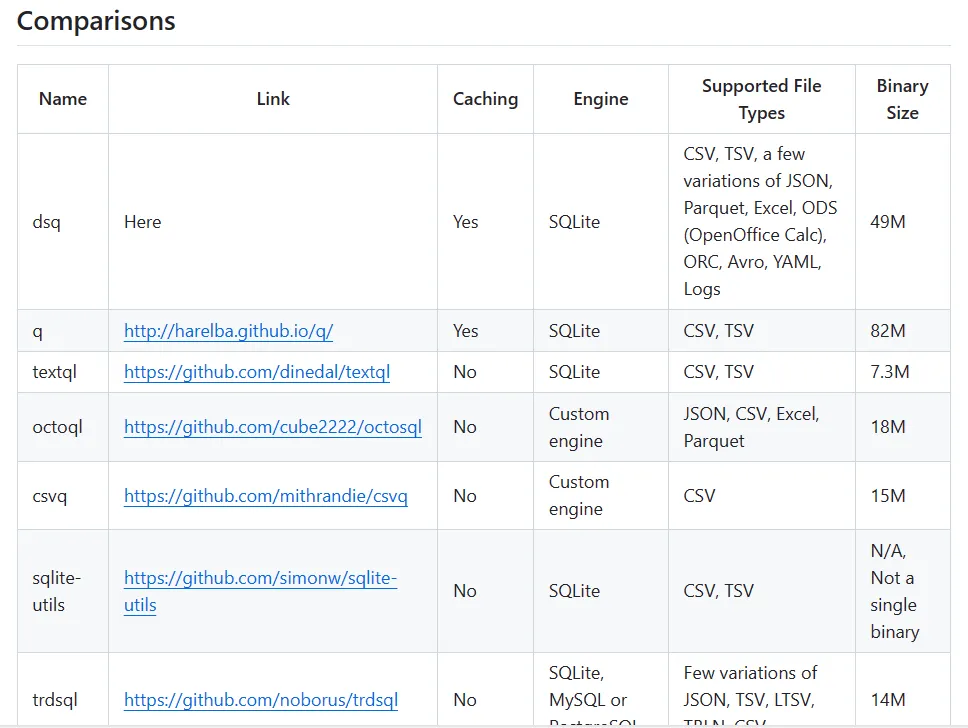
There are many similar tools on the market, and the author has conducted detailed research and analysis, concluding that dsq is currently the most comprehensive and performs at its best.
The image below compares various data processing tools on the market. Comparatively, dsq still has a significant advantage.
Performance Features
- Supports multiple file formats including Excel, JSON, CSV, XML, YAML, Markdown, and Text
- Use standard SQL statements for operations, no need to learn new syntax
- Supports multiple advanced features including regular expressions, caching, functions, and scripts
- Excellent performance, uses efficient underlying libraries, fast analysis speed
- Open source and free, code is open, can be freely used and modified
Installation
The installation is very simple. For Windows, just go to the GitHub project releases page, download, and unzip to use.
For macOS, execute the following installation command
brew install dsqFor Linux, you can use the following installation:
VERSION="v0.23.0"
FILE="dsq-$(uname -s | awk '{ print tolower($0) }')-x64-$VERSION.zip"
curl -LO "https://github.com/multiprocessio/dsq/releases/download/$VERSION/$FILE"
unzip $FILE
sudo mv ./dsq /usr/local/bin/dsq
Usage
The most basic usage is dsq filename or dsq filename "SELECT * FROM {}.
For example:
dsq testdata.json "SELECT * FROM {} WHERE x > 10"Sometimes reading directly can make the formatting look messy.
You can use the -p or --pretty parameters to beautify the content.
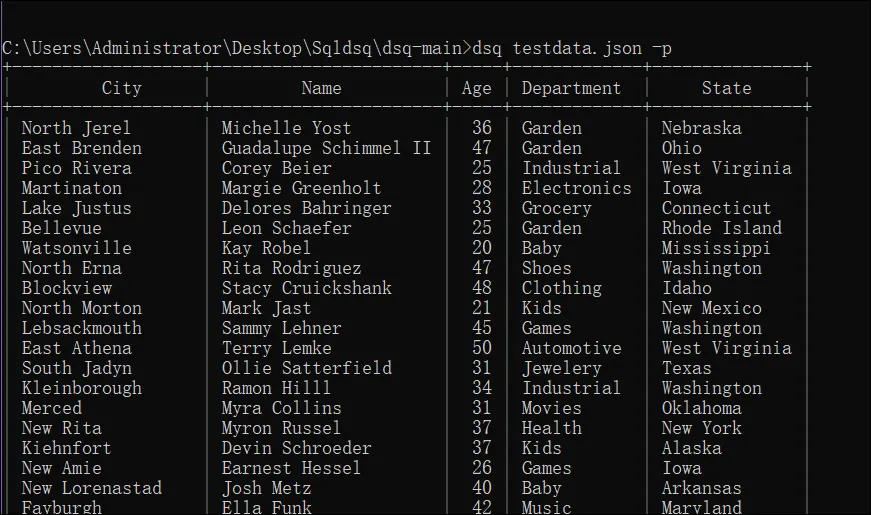
If you want to read multiple files, you can use the following method:
dsq a.csv b.json "select {0}.name, {1}.age from {0} join {1} on {0}.id = {1}.id"a.csvb.json represent the two files to query, and in the above select statement, they are represented by {0} and {1}.
Additionally, dsq also supports reading the contents of all sheets in Excel.
For example, the file c.xlsx has two sheets. You can use the following method to query the content in sheet2.
dsq c.xlsx "SELECT COUNT() FROM {'Sheet2'} where Country='China'"Regarding piping data, directly use the pipe symbol | to pass data, and add the -s parameter to specify the file type being passed. For example:
cat testdata.csv | dsq -s csv "SELECT * FROM {} LIMIT 1"The above are just some basic functions of dsq. There are also more advanced operations such as regular expressions, caching, etc. For details, you can check the official page.
Related Software

NFile Converter - v2.0.2

NOpen Source Reading - V 3.25

NTVBox - v 0923

NWatt Toolkit - v3.0.0-rc.13

NUiverse - 1.0

NPowerToys - V 0.86.0

NLX Music Assistant - V 2.9.0

Nyt-dlp - v 2024.12.13