DBeaver Community
DBeaver Community

DBeaver Community26.1.4

Officialads5

A cross-platform database tool for SQL editing, data browsing, import and export, and schema management.

Last update:
2026年8月2日
Language:
CREDIT Chinese, Multilingual
Platform:

109.93 MiB0 Already downloaded Mobile view

DBeaver Community is a free, open source, cross-platform database management tool available on Windows, macOS, and Linux. It integrates database connection, object browsing, SQL writing, table data editing, import and export, and daily maintenance into a desktop interface. It is suitable for developers, data analysts, operation and maintenance personnel, and users who need to manage multiple relational databases at the same time.

It connects to common databases such as MySQL, MariaDB, PostgreSQL, SQLite, and SQL Server through database drivers, and the project and connection configuration are saved locally. Community Edition does not require a subscription, nor does it limit the SQL editor or data editor because of the free version, but some NoSQL, cloud platform integration and enterprise collaboration capabilities belong to DBeaver PRO and need to be distinguished clearly when choosing the version.

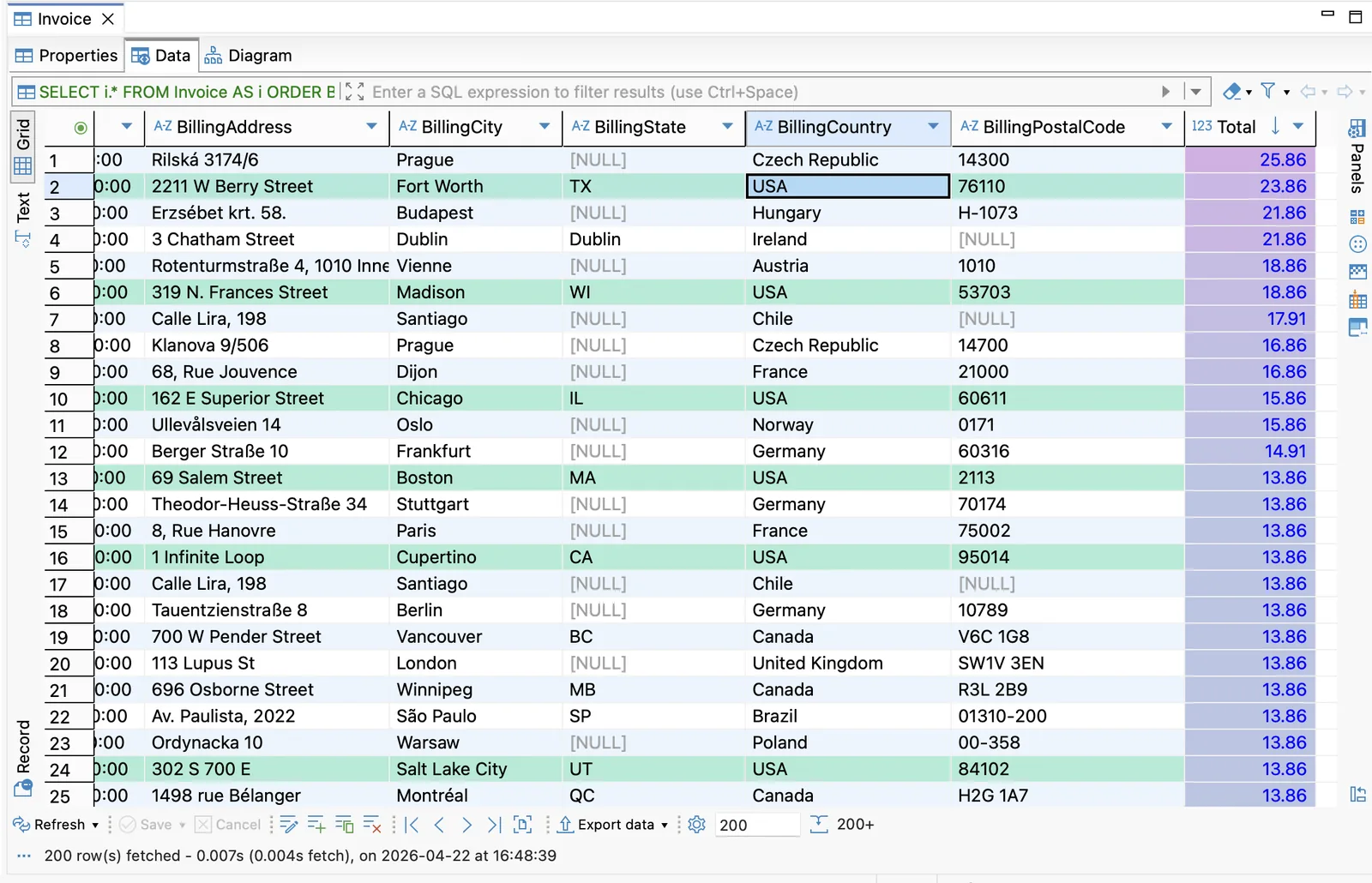
DBeaver data editor table browsing and editing interface
DBeaver official data editor interface, displaying table data, filter columns and editing tools

Core functions

  • Unified connection management: Centrally save and organize different database connections in the database navigator, browse objects by connection, database, schema, table, view and stored procedure.
  • SQL Editor: Provides syntax highlighting, auto-completion, formatting, parameters, execution plans and result panels, and can save and reuse multiple SQL scripts under one connection.
  • Data Editor: Browse and modify table data in a spreadsheet-like grid, supporting filtering, sorting, grouping, record view, value viewer and batch saving.
  • Data transfer: Import or export data between tables, query results, and files. Common tasks include CSV exchange, SQL script export, and cross-database table migration.
  • Structure and relationship viewing: View columns, indexes, constraints, permissions, and DDL through the Object Editor, and understand the relationships between tables using ER diagrams.
  • Task and maintenance tools: Save some import, export and database maintenance operations as tasks to reduce repeated configurations; specific capabilities will change with the database driver.

Product Features

The value of DBeaver Community is that one interface covers multiple databases. When frequently switching between PostgreSQL, MySQL, and SQLite, you don’t have to re-adapt a client to each database; the database navigator, SQL editor, and data grid operate basically the same way. The official installation package already contains OpenJDK 21, and ordinary users do not need to configure the Java environment separately.

The software supports Simplified Chinese, and the language can be switched in “Window → Preferences → User Interface”. Its function density is high, and connection, transaction, automatic submission and data saving status all need to be carefully confirmed; when connecting to some databases for the first time, you may also go online to download the corresponding driver. The interface is slightly complex for users who only want to temporarily view a SQLite file, but it is more advantageous for people who need to manage multiple connections in the long term.
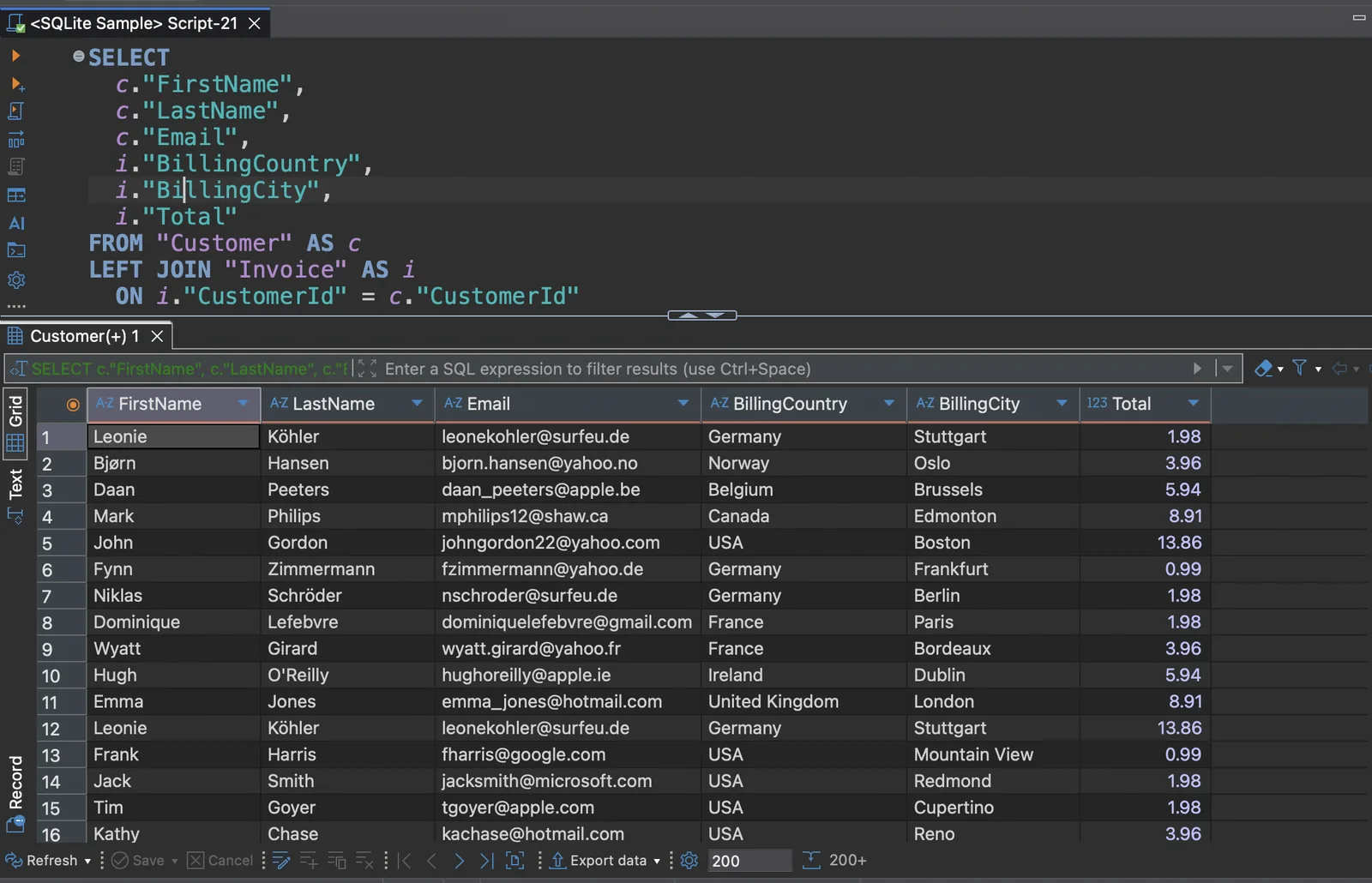
DBeaver SQL editor and query result interface
DBeaver official SQL editor interface, showing query scripts, result tables and database navigation

Installation and usage tutorial

  1. Select the system from the DBeaver Community official download page. Windows 10/11 can use the x86_64 or ARM64 installer; macOS downloads the DMG of the corresponding chip and drags it into “Application”; Debian/Ubuntu can install DEB, Fedora/RHEL can install RPM, and Linux also provides compressed packages.
  2. After starting for the first time, click “New Database Connection” and select the database type. Fill in the host, port, database name and your own database account, and then click “Test Connection”. If prompted to download the driver, only accept the official driver configuration displayed by DBeaver, and do not look for another JAR file from unknown websites.
  3. After the connection is successful, expand the schema and table in the database navigator on the left. Double-click the table to view attributes, data, and diagrams; open the “Data” tab and use the top filter bar to narrow the results.
  4. When you need to execute a query, select the connection and create a new SQL script. First confirm that the correct connection and mode are displayed at the top of the editor before entering SQL; you can first execute a read-only query to check the results. Before modifying or deleting data, prepare a backup and check the transaction mode.
  5. After editing the table data, the changes will be retained in the local editing state first and click “Save” before submitting; when unsure, click “Cancel” to discard unsaved changes. When there is no primary key or the connection is read-only, some rows may not be directly editable.
  6. When you need to export, select “Export Data” in the table, query result, or data grid, and follow the wizard to select the format, fields, and save location. Before migrating large amounts of data, perform a test run with a small number of records to confirm encoding, dates, null values, and target field mappings.

Applicable scenarios

  • Application Development Debugging: View local or test environment databases, execute SQL, check indexes, and quickly correct small amounts of data.
  • Multiple database operation and maintenance: Use a unified interface to manage multiple relational database connections to reduce the cost of switching between clients from different vendors.
  • Data analysis and verification: Filter, sort and export the query results, use the data grid to complete light inspection, and then hand it over to the table or analysis tool for further processing.
  • Database learning: Use local SQLite, PostgreSQL or MySQL environment to observe table structure, constraints, relationships and SQL execution results.
  • Structure sorting and migration preparation: View DDL, ER diagram and object properties, first understand the dependencies, and then plan cross-environment or cross-database migration.

Free scope and license

DBeaver Community Edition is free to download and use normally. The source code is released under the Apache License 2.0 license. The software itself has no in-app advertising. Community Edition provides core capabilities such as relational database connections, data editors, SQL editors, tasks and maintenance; broader NoSQL, cloud data sources, enterprise security and team functions are mainly provided by the Commercial Edition. When connecting to commercial databases or cloud services, database licensing, server, network and cloud resource costs are still borne by the user.

Usage evaluation

The maturity and reach of the DBeaver Community make it perfect for use as a daily database workbench. The connection management, SQL editing, data grid and export process are naturally connected, which is especially trouble-free for those who maintain multiple databases at the same time; the official documentation, release rhythm and cross-platform installation packages are also relatively complete.

It is not a minimalist tool. There are many menus, panels, and preferences, and first-time use requires understanding concepts such as connections, drivers, transactions, and workspaces. Minimum permissions, read-only priority, and backup before operation should still be adhered to on the production database, and the graphical interface should not be used as a reason to skip the review. If you only need to occasionally open a single small file, you can choose a more lightweight dedicated client; if you need to manage multiple databases for a long time, DBeaver Community is more worth investing in learning time.

Update instructions

The current stable version is 26.1.4, released on August 2, 2026. This version adds keyboard operations and new SQL console options to AI Chat, fixes the result labels of multi-query scripts, data editor search and replacement, and task sorting issues, redesigns table mapping for database migration, and updates Jetty Security and PostgreSQL drivers to fix disclosed vulnerabilities. Windows x86_64 installer is approximately 109.93 MiB.


Share:

Related Software