Syncthing - 2.1.3
An open-source tool for synchronizing selected folders directly between multiple devices.

A cross-platform, open-source password manager that stores credentials in an encrypted local KDBX database.
34.24 MiB0 Already downloaded Mobile view
KeePassXC is a free, open-source, cross-platform password manager supporting Windows, macOS and Linux, which saves account numbers, passwords, web sites, attachments and notes in locally encrypted KDBX files, which can be organized by grouping on a daily basis, and can search, generate high-intensity passwords, and expand the login information through browsers.
I’ve done a cross-reference to KeePassXC official network, introductory guide, user manual and 2.7.12 distribution records. It is suitable for users who wish to keep their password files themselves and are willing to carefully process the master password and backup. The software does not operate cloud accounts for users and does not have a service to retrieve the master password. KDBX files are lost, damaged or the master password is forgotten and the responsibility lies with itself.
KeePassXC saves password data in a continuously encrypted KDBX file. Users can create work, shopping, social grouping, etc., and keep user names, passwords, web sites, notes, custom fields and attachments for each record. The entries support tags, searches and historical versions, and change the content and have the opportunity to recover from the historical record.
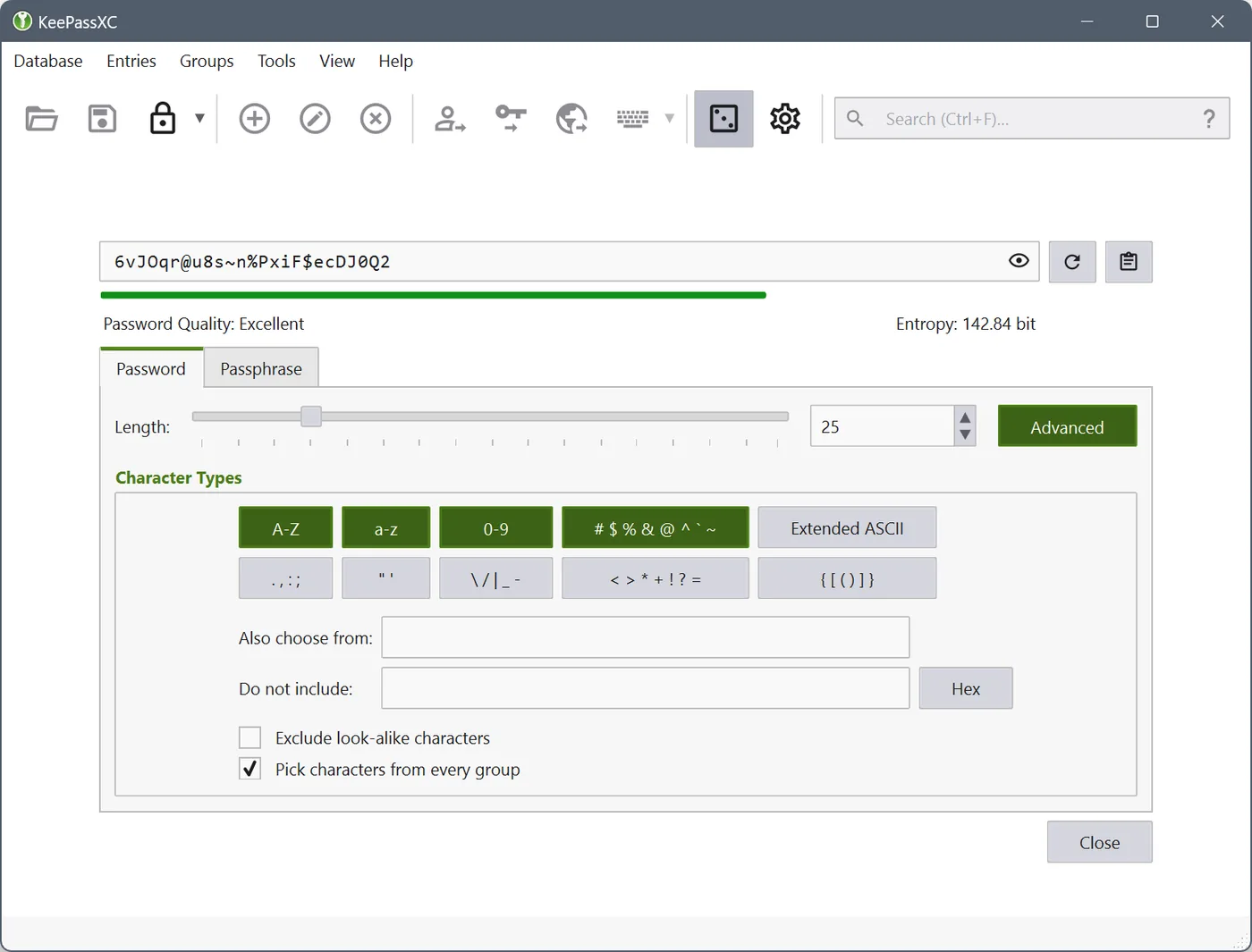
The built-in password generator can generate random passwords by length, type of character and exclusion rules, as well as passwords consisting of multiple words. The software also supports TOTP dynamic authentication codes, automated input, database health reports, duplicate or weak password checks, and imports data from sources such as 1 Password, Bitwarden, Proton Pass, CSV. Some of the high-level functions require a first understanding of a secure boundary. Don’t start.
KeePassXC-Browser Extension covers Chrome, Firefox, Edge, Chromium, Vivaldi, Brave and Tor Browner. After matching the desktop application with the extension, the browser can find matching entries from a unlocked database, by user confirming the account number and password. The key also relies on the browser to extend the linked database.
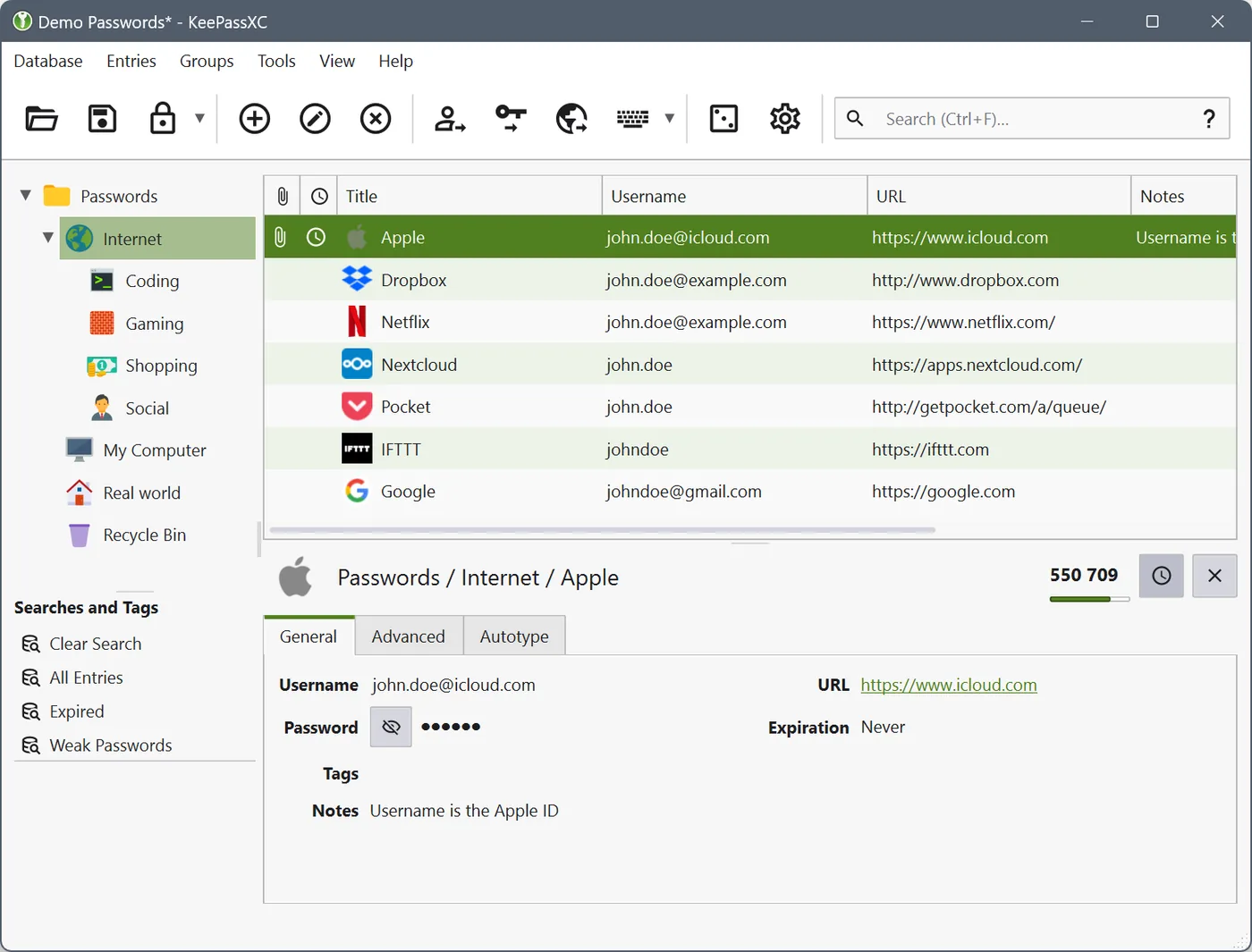
KeePassXC’s core data files remain on the user device, and the official network clearly states that the software does not have built-in cloud services, advertisements, subscriptions and tracking. KDBX files can be placed on a local hard drive or can be placed in a trusted sync directory by the user. Synchronization only transfers this encrypted file. Backup still has to be done.
The desktop interface places the grouping, entries and details in the same window and the English translation is already included in the official repository. Windows 10 and 11 have 64-bit installation programs and portable versions, macOS 12 and above provide Intel and Apple chip versions, Linux official network gives priority to Flatpak, as well as AppImage, Snap and some distribution source portals.
Local custody provides clear control and increases operational responsibility. The main password was not reset online, and the database was opened to guard against malware, screen viewing and administrator privileges. The browser automatically fills in both KeePassXC, unlocks the database and correctly connects the extension. Users with high security requirements may also use key files or hardware keys. The setting will be more troublesome.
Personal management of a large number of website accounts is the most direct scenario. Each site uses different random passwords, and the browser extension is responsible for filling in, and users need only remember the main password of the database. People who regularly switch between Windows, macOS and Linux can also continue to use the same KDBX file format.
Developers, transporters and privacy-sensitive users can save general accounts, token notes, attachments and one-time authentication code groups. Many people work together with caution. KeeShare provides an entry-sharing capacity, but it is closer to senior-level document collaboration, and additional processes are required for authority management, conflict management and member handover.
Users already using KeePass, 1Password, Bitwarden or Proton Pass can first use the official import function for migration testing. Once the import is completed, the site, attachments, grouping and dynamic authentication codes are selected to confirm that the new database can be reprocessed. For those who do not wish to manage back-up and synchronization at all, it is usually more economical to restore the service with account numbers that are synchronized with the hosting.
KeePassXC desktop application is free of charge and does not have subscriptions, advertisements and built-in tracking, nor does it require registration of cloud-end accounts. The network receives donations to support development and project expenditures. The browser extension is also provided by the project, and specialized versions of the core local password management, generation, automatic input, browser integration and database reporting are not required.
The project’s COPYING document states that KeePassXC’s main program can be used under the GPL-2.0 or GPL-3.0, and some third-party documents are subject to a different licence. General user installation and use is not subject to cost restrictions. When the software is prepared to be modified, distributed or the code used for other items, it should be processed according to the licence and copyright description of the specific document.
KeePassXC matures the local password library sufficiently, the interface is not deliberately simplified into several large buttons, and grouping, search, generator, automatic input and browser integration can be found in the normal menu. It will take half an hour to understand KDBX files, master passwords and backups, and then the use will be steady.
Its threshold falls mainly on data liability. The software does not save the key for the user and does not automatically resolve multiple device file conflicts. My judgment is that individual users who want to have their own password file and who are able to execute the backup plan fit KeePassXC. Those who want to open boxes, i.e., use, autosynchronize across devices and work with family members, need to accept additional configurations first, or a password manager with more hosting services.
The current stable version, 2.7.12, was published on March 10, 2026. Windows 10 and the 64-bit MSI installation program about 34.24 MiB. The distribution page also provides portable ZIP, old Windows installation packages, macOS mirrors for Intel and Apple chips, Linux AppImage, source code, summary and signature files.
2.7.12 Add an TIMEOTP automatic placeholder to display a matching web site in the browser access confirmation window and to support the import of embedded folders for Bitwarden. The pass key saves backup eligibility and backup status tags. The maintenance also includes limiting the risk of Windows DLLs being injected by malicious OpenSSL configuration, repairing Linux auto-entry competitions, browser settings display and attachment file name processing. The official repository was not archived and the code was still submitted on 24 August 2026.