Kopia - 1.0
A cross-platform, end-to-end encrypted open-source backup tool with compression and deduplication

An open-source tool for synchronizing selected folders directly between multiple devices.
11.45 MiB0 Already downloaded Mobile view
Syncthing is a free, open multi-equipment file sync. It allows two or more computers to exchange documents directly, which are not stored in the project ‘ s central disk. Home-based Windows computers, accompanying Mac and a Linux host run Syndthing so that they can synchronize the folders according to the set and there is no cloud-drive package. No registration is required.
This option places the data on its own device, the transfer connection is encrypted using TLS and both parties need to add each other the device ID to connect. The costs are clear. Both sides have to be dressed. Each equipment will also be kept in operation, with the first matching login of the normal cloud disks in excess of a few steps. Deletion and modification are transmitted to other devices, and Syncthing is also explicitly cautioned that it cannot replace independent backup.
Syncthing keeps monitoring shared folders. When a document changes, it compares by data block. Only the part that changes. When a large document changes a small block, it is not necessary to pass it over from scratch. The equipment in the local area network can be directly synchronized, and the device will try to find and repeat connections when it is not in the same network. Ordinary users usually do not have to manually fill in their IP addresses.
The Web management interface places the home folder, remote devices, synchronized progress, upload download speed and connection status on the same page. Each folder can be shared only with the specified device. When you change the same file on both sides, the software keeps a conflicting copy. Conflicts have to be handled by themselves.
Folders support two-way synchronization, only sending and only receiving. Only one reference copy is suitable for preservation and only data suitable for receiving other equipment in a single device. Users can also open file version control for individual folders and place older files in the version directory before remote changes or deletions. Version control is by default closed, and only part of the error is filled and a separate backup is required.
Syncthing doesn’t have to buy cloudy space. The project party will not save the file for the user, and where the data exists will be determined by its own device. Inter-equipment communications are encrypted and can only be joined by equipment expressly permitted by the parties. The project agreement, client and development process is open and long-term maintenance records are complete.
It runs the management interface in the browser, which is allowed only by default. The interface supports Chinese. The Windows base version is a compressor package, so a double-clicking program after depression opens the management page and does not provide traditional installation guides. The network also lists the Windows Tray Tool and the macOS application envelopes that are suitable for users who wish to open the self-starter and stay in the menu bar. The different envelopes are maintained by their respective projects and the rhythm of the versions may differ from the core procedures.
Networks are needed for connection detection, relay and file indexing. The projecter will not save the content of the document, the global discovery service may still know the network address of the device, and network observers may also judge that Syncthing is being used. Manage page default on the listening address and do not recommend direct exposure to the public network for remote management.
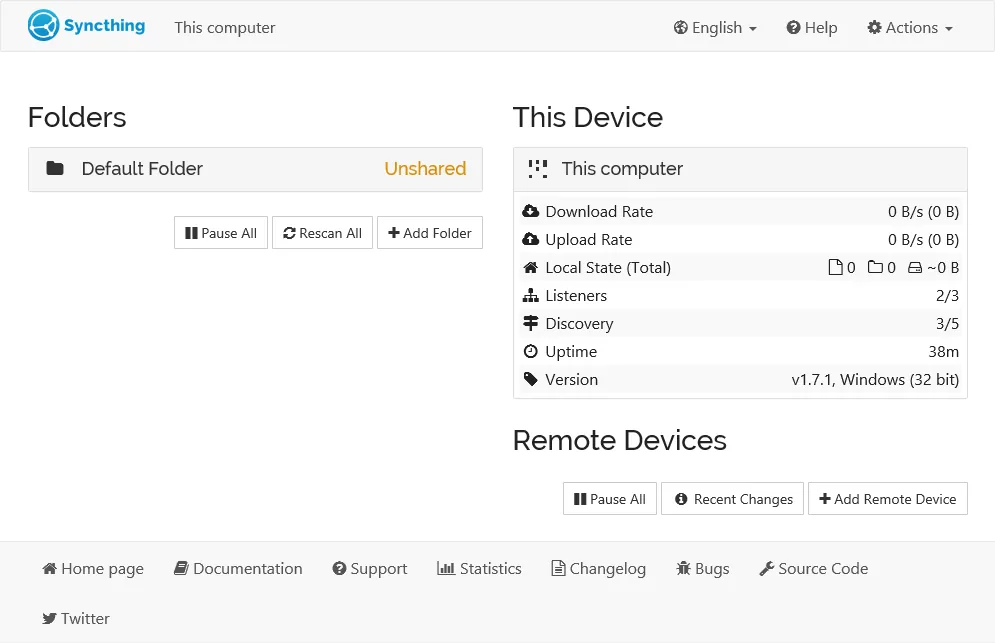
syncthing.exeI don’t know. First run generates configuration and device keys, then opens in the default browserhttp://localhost:8384/I don’t know. The terminal window needs to be kept running. macOS gives priority to the Syncthing for macOS applications and Linux users can also use Debian or Ubuntu software sources maintained by the Network.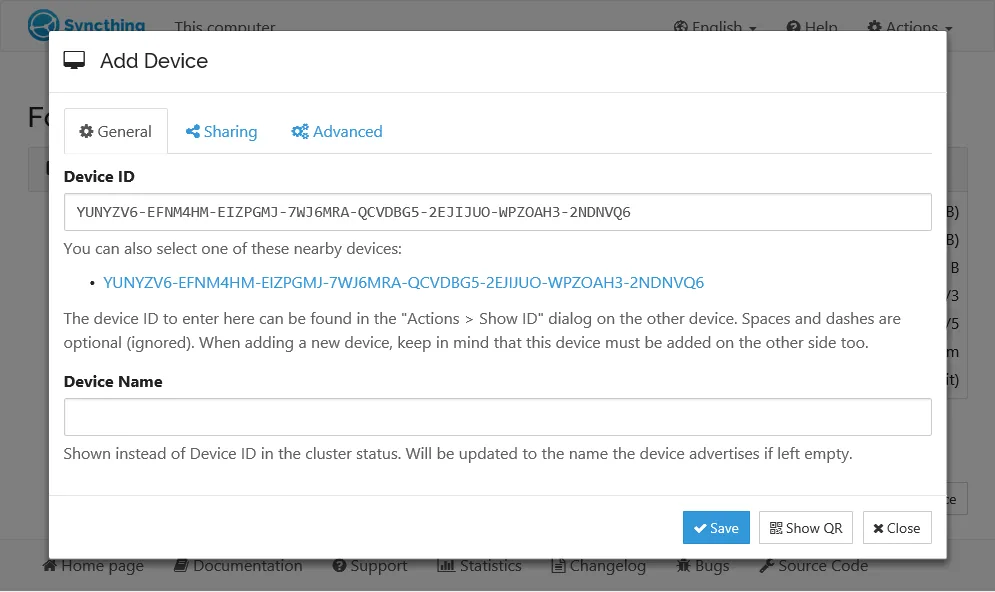
There is a computer at home and in the office, which can be used to synchronize documents, photographs and project directories. Photo and video workers can automatically update the material between the workstation and the storage mainframe. A small team can only share a folder with the designated member, without having to hand over the entire information to the same cloud. Users with NAS or frequent Linux hosts can also use it as a multi-equipment sync node.
It is also appropriate for people who do not want to be limited in cloud capacity. Both end-end equipment needs to be synchronized at the same time online or on a rotational basis through a standing device. People who use only one cell phone, who wish to look at cloud documents at any time, or who are unwilling to process equipment pairs and conflict documents, use a normal cloud dish to make things easier.
Syncthing core program is free of charge, with no advertising, subscription and capacity charges. Official repositorys use MPL-2.0 licences, with distribution packages for Windows, macOS, Linux and various BSD systems. Users need to prepare their own equipment, hard drives and networks, and NAS electricity and storage costs are borne by themselves.
The system integration tools listed in the official network have their own maintainers and licences. The basic sync function does not depend on these envelopes. iOS does not have an official client maintained by the project team, third-party mobile applications may be charged or may be restricted by back-office operations and are not included in the draft as an official download entry.
Syncthing is well suited to a person who has two or more computers and is willing to own the location of the file. It does not have an account number and a capacity package, and the folder is intuitively related to the equipment ‘ s authorization. Once the operation has stabilized, daily synchronization is hardly repeated.
The first configuration still has learning costs. Device ID requires a two-way confirmation that the Windows base will leave a terminal window and that conflict files and folder patterns will need to be understood. It faithfully disseminates changes and deletes, and the error or deletion of documents may soon appear on all equipment. Version control mitigates losses and independent back-up remains.
The current stable version, 2.1.3, was published on 5 August 2026. Windows Intel or AMD 64 official compressed packages about 11.45 MiB. This version focuses on the repair of neglecting rules, health checks of folders, database connections and UI group display problems. The official repository was not archived and new submissions were still pending on 18 August 2026.