Sidebery - 5.6.1
A Firefox extension for organizing tabs with trees, panels, containers, groups, and snapshots.

A community-powered, open-source extension for skipping sponsored and repetitive segments on YouTube.
1.78 MiB0 Already downloaded Mobile view
SponsorBlock is a free, open-source browser extension to skip the community-specified feed from YouTube. It also handles heads, tails, subscriptions, non-musical paragraphs and the self-promoting of creators. The extended installation is followed by a query on the shared database during playtime, and automatically skips the settings when you encounter an existing period. No registration is required.
It handles the video author’s direct footage. YouTube page ads are still being sent to Premium or other compliance tools. Community databases also determine the practical effects, with new or cold-door videos that may not be marked for the time being, and error clips requiring users to undo skipping and vote for amendment. This is its border.
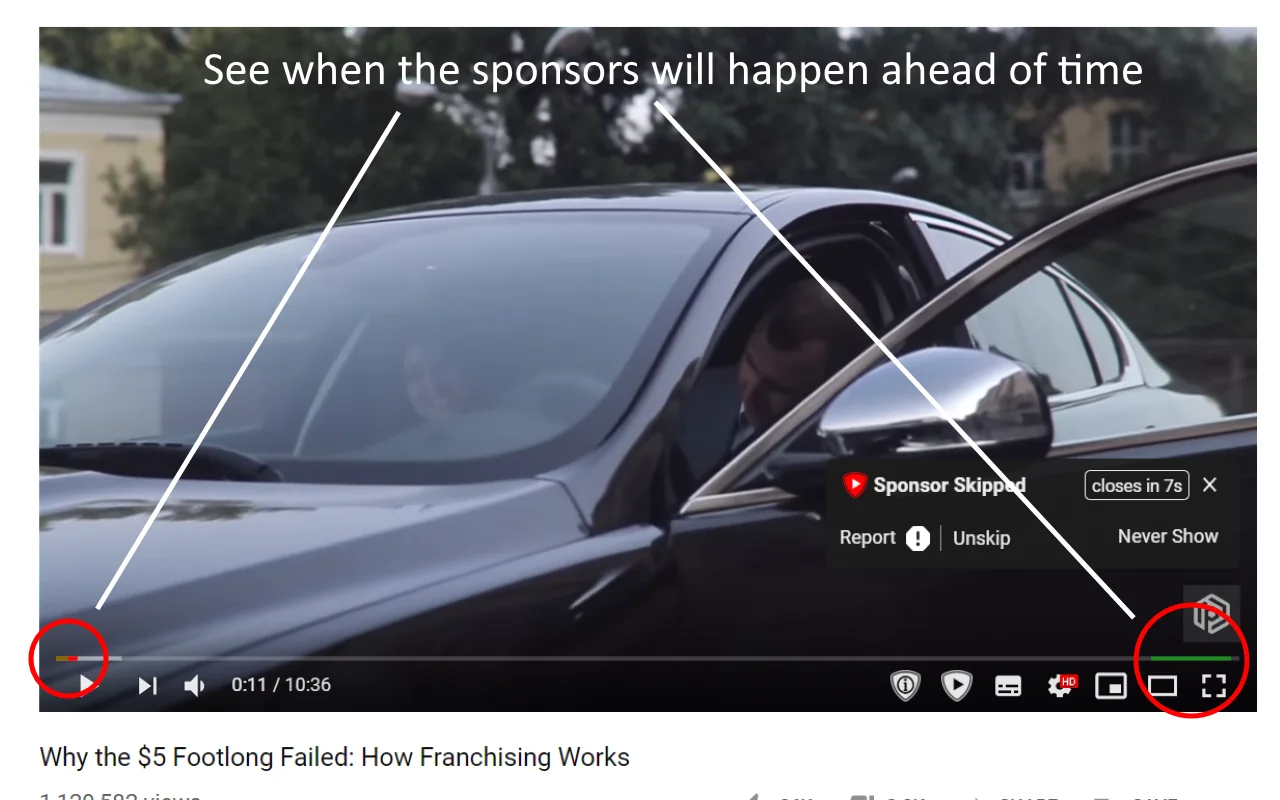
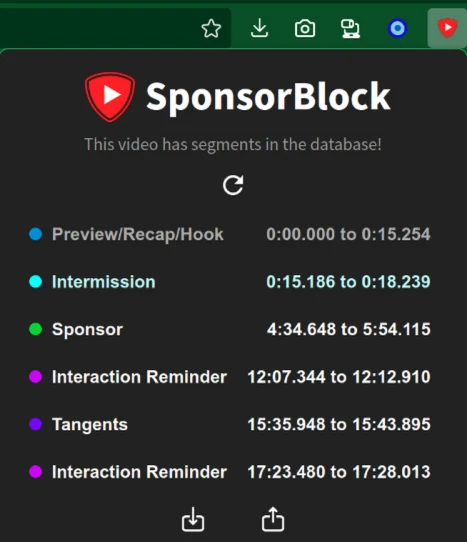
The extension displays different segments as coloured time axis markers. Sponsoring, end-of-session, interactive alarms, preview reviews and off-the-shelf content can be set in automatic skipping, skipping after asking or only displaying marks. Sets very fine. Those who prefer to keep certain types of content can adjust them individually without having to close the entire set together.
Skipping occurs with a hint on the right side of the player that the user can cancel immediately and can report errors or vote on an already existing clip. Community members can also mark new clips with start and end buttons on the player, previewing them and then submitting them. The review relies on the user ‘ s credibility and voting, and the speed of coverage varies with the video heat.
SponsorBlock supports Chrome, Chromium, Firefox and Edge and can also be used on Firefox for Android. It also supports YouTube ‘s no Cookie domain name and the Invidious frontend. When you customize a third-party frontend, the browser may ask for access to the corresponding website.
SponsorBlock’s value comes from a ready-made community label. Chrome shows about 2 million users and 4.6 cents, Firefox shows more than 730,000 users and 4.8 cents, and popular videos are usually easier to fix in a timely manner. The source code and database are made public, and users can also view the project ‘ s query mechanism and service status.
Extension requires reading and modifying the YouTube page and connecting the SponsorBlock server query clips. When submitted or voted, randomly generated user identifiers are used to calculate the credibility of contributions. The developers of the Chrome store stated that the data would not be used for unrelated purposes or for credit evaluation. It can’t be separated from the network. Server failure, network interception, or a new version of the YouTube page may result in automatic jump-out.
Those who regularly watch long interviews, tutorials and podcast videos can reduce the disruptions caused by repeated sponsorship of the broadcasts. When following a fixed channel, the tails of the film and the Subscriptions can also be handled according to personal preference. Music video users can choose to skip non-musical paragraphs. Those who are willing to participate in community maintenance will also be able to supplement the time period for the immediate benefit of later audiences.
The mainstream version is free of charge. Chrome, Firefox, Edge and Firefox for Android do not have advertising and must subscribe. The official repository notes the target as GPL-3.0-or-later, the source code is publicly available and the database also provides a public download portal.
The Safari version covers macOS and iOS, App Store version for fees. Users can also build their own free versions from the source code, but this route requires Xcode, signature and extension settings, which are clearly not suitable for people who simply want to fit in. The network accepts voluntary contributions, which do not unlock core functions.
SponsorBlock is simple to install, the default settings are already able to handle the most common sponsored clips, and classification can be adjusted separately. The community is large, and the coverage and correction of popular video is usually faster. It saves time. The different promotions can still be handled according to their own preferences.
It’s as clear as it gets. The new video needs to be marked, and the cold content may remain undatad and occasionally encounter border impermissibility or classificational disagreements. Extensions require access to YouTube pages and connections to community servers. Users seeking complete offline or unwilling to grant page privileges are unsuitable. The automatic skipping is too radical and may also miss out on what creators want to see.
The current stable version is 6.1.7 and was published on 13 July 2026. This version fixes the problem of extension failure when Firefox disables Cookie. Firefox Official Shop, approximately 1.78 MiB, provided 6.1.7. The Chrome store page still shows 6.1.6 at the time of verification. The difference is common. A short delay will result from shop audits and batches, the official repository is not archived and the code is still being updated in August 2026.