Stellarium is a free and open source astronomical simulation software that supports Windows, macOS and Linux, and also provides a web version for direct experience. After opening the software, the screen will display the sky at that time according to the observation location, date and time. Stars, planets, constellation lines, the Milky Way and the horizon will appear in the same picture, and you can gradually zoom in from a full-sky perspective to a single celestial object by scrolling the mouse.
It is suitable for people who are just starting to recognize stars, and can also assist astronomy enthusiasts in arranging observations. Regular users can search for the Moon, Jupiter or Orion, change the time and see where they rise. Once you are familiar with it, you can also use tools such as astronomical calculations, eyepiece simulation, satellite data, and telescope control. The simplified Chinese interface has been officially provided. The basic star viewing process does not require a command line and does not require registering an account.
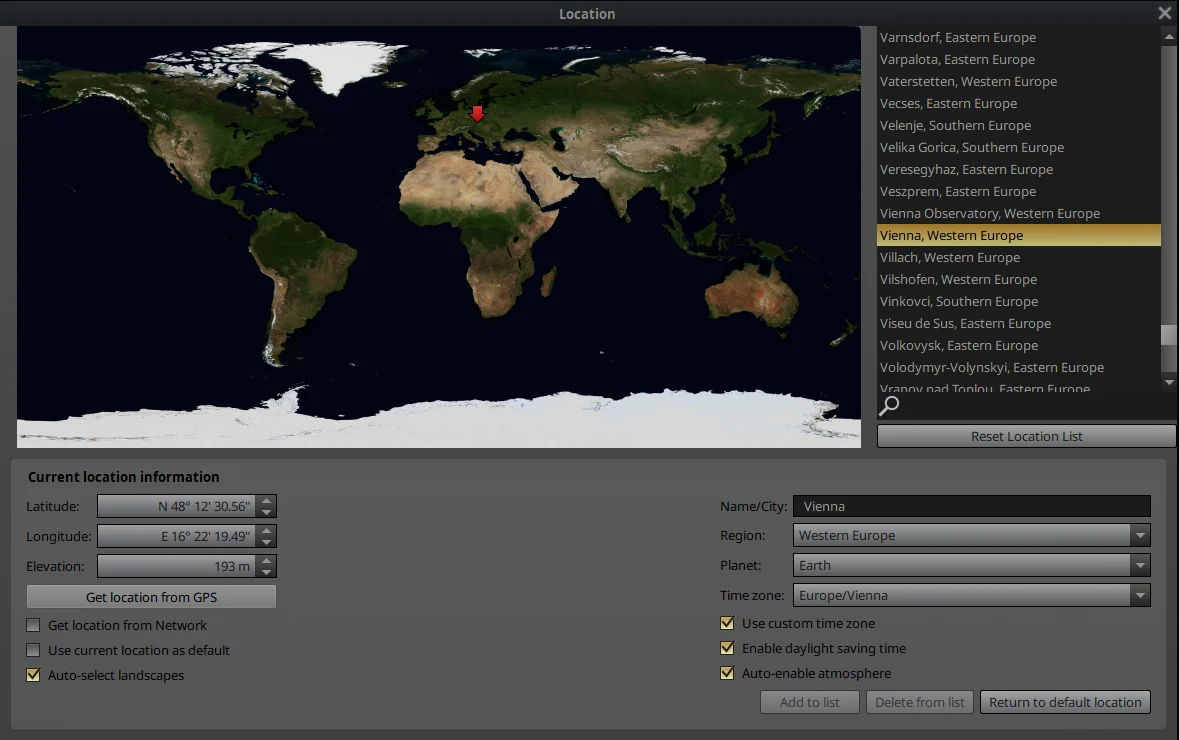
Stellarium official user manual interface, showing observation location, time zone and environment settings
Core functions
Real-time starry sky simulation The software calculates the sky position based on location and time, displays stars, planets, satellites, nebulae and the Milky Way, and restores atmospheric light and shadow, landscapes and star twinkles.
Celestial object search and zoom You can quickly locate the object after entering its name. Mouse zoom is suitable for viewing the target step by step from the naked eye perspective. The screen can also display constellation names, connections, borders and constellation drawings of different cultures.
Time Control Users can pause, speed up or rewind time, observe the rise and fall of the sun and moon, planetary movements, eclipses, meteors and other phenomena, and can also switch the date to the night of the planned observation.
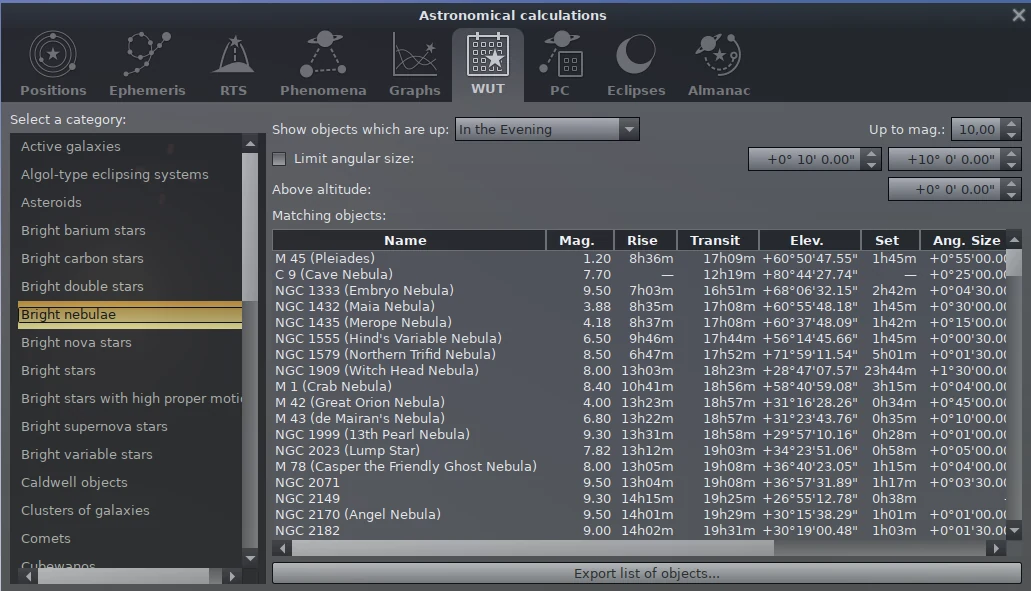
Astronomical Calculations Built-in tools list celestial object positions, brightness, rise and set times, ephemeris, and visible phenomena. Filtering results can help users pick targets that are more visible that night.
Observation aid The eyepiece plug-in can simulate the field of view of a telescope and binoculars, and the observation list makes it easy to save targets. Telescope control, dome projection and scripting functions are more suitable for users with equipment or advanced needs.
Extended Data The software supports additional star catalogues, all-sky survey images, satellites, comets and asteroid data. Online updates will use the network, and the basic starry sky simulation can be run locally after installation.
Product Features
Stellarium puts complex astronomical data into a picture that is close to the real night sky. People who are new to astronomy can first identify directions and constellations without having to learn coordinates first. When an accurate position is needed, the left window can also display right ascension, declination, azimuth, altitude and rise and fall time. The same set of software can be used from entry to observation preparation.
It has many functions, and you don’t have to understand all the buttons when you open it for the first time. Setting the location first, and then learning to search and time control is enough to complete most daily stargazing tasks. High-precision star catalogs, telescope controls, scripts, and custom landscapes can be left for later. The official minimum configuration requirements are a 64-bit system, 1 GiB of memory, 1 GiB of disk space, and a graphics card that supports OpenGL 2.1. Using more star catalogs, survey images, or 3D landscapes will take up more space and graphics card resources.
Stellarium Official user manual interface, showing the list of celestial objects, brightness and rising and setting times
Installation and usage tutorial
Enter Stellarium Simplified Chinese official website. Windows 10 or newer systems prefer the 64-bit installer of Qt6, Windows 7 can choose the Qt5 version, and ARM devices use the ARM64 installation package. For macOS and Linux users, follow the system entry on the page to download.
Launch the software after the installation is complete. When opening it for the first time, move the mouse to the lower left corner and search for the city in the location window. If you cannot find a small city, you can select a nearby city or fill in the latitude and longitude. Location affects the direction and rising and setting times of celestial objects.
Open the date and time window and set the time to the night you plan to observe. The bottom time button allows you to pause, resume and adjust the speed. If you want to see when a certain star rises, you can speed up the time and observe the changes in the sky.
Press the search button to enter the moon, Jupiter, Polaris or other targets, select the result and let the perspective follow the target. Scroll the mouse to adjust the field of view and open constellation names, connections and ground displays as needed.
Before going outdoors for observation, check the height, brightness and rise and fall time of the target in the astronomical calculation tool. The horizon is easily affected by buildings, clouds and the atmosphere, so targets with higher altitudes are preferred.
When you need to simulate binoculars or telescopes, enable the eyepiece plug-in and fill in the device parameters. Connecting the physical telescope, running scripts and installing additional star catalogs are advanced operations. Please read the official user manual first and save the original settings.
Applicable scenarios
Getting started with star recognition in the city Confirm the direction, time and constellation position indoors to make it easier to find the target when you go out.
Parent-child astronomy learning Adjust the date and time to visually see the moon phases, planetary movements and the four-season starry sky. It is suitable for use in conjunction with natural science courses.
Observation Plan Astronomy enthusiasts can compare the heights and rising and setting times of celestial bodies and sort out the order of observations that night in advance.
Photography composition preparation Estimate the approximate position of the moon, the Milky Way or bright planets through location, time and field of view simulations. The actual shooting still needs to be combined with the weather and on-site terrain.
Classroom and Planetarium Demonstrations Teachers can demonstrate constellation culture, celestial motion and eclipse processes, and the dome projection and scripting capabilities are suitable for further production of demonstrations.
Free scope and license
Stellarium desktop version can be downloaded and used for free. The source code adopts GPL-2.0 license. The official installation package has no subscription threshold and no built-in advertisements. Windows, macOS, and Linux versions are officially provided by the project. The software accepts donations, and donations do not affect basic functions. Normal network traffic occurs when using online sky surveys, satellite data, and other network resources.
Usage evaluation
Stellarium is perfect for turning an abstract star map into a sky that can be moved and scaled. After learning the three settings of location, time and search, ordinary users can already find constellations, see planets, and prepare for a suburban observation. The simplified Chinese official website and interface make it easier to get started, and the long-term maintained official manual can also answer follow-up questions.
The software is relatively large, and the Qt6 version installer for Windows 10 is about 455.77 MiB. After opening high-precision star catalogues, sky survey images and 3D landscapes, the requirements for graphics cards, memory and disks will also increase. People who just want to look at the sky occasionally can use the default data and web version first. When they are ready to seriously study astronomy or connect devices, the desktop version of the complete tool is more suitable.
Update instructions
The current stable version is 26.2, released on June 24, 2026. This version adds the Chinese star official culture of the Yuan Dynasty, new aircraft plug-ins, star track display and location map zooming, updates the default satellite, pulsar, exoplanet and small celestial body data, and also fixes moon surface rendering, astronomical calculations, calendars, Linux graphical interface and multiple OpenGL compatibility issues. The Qt6 x86_64 installer for Windows 10 and above is approximately 455.77 MiB.
A CarPlay receiver for compatible BYD Android head units, with USB and wireless connections. Public preview with experimental authentication and compatibility limits.