ImHex - v1.38.1
Hex Editor

GitHub's open-source desktop client for managing repositories, branches, commits, and synchronization.
293.21 MiB0 Already downloaded Mobile view
GitHub Desktop is the official GitHub free open-source desktop client for users who want to manage the Git repository and do not want to start with a large number of commands. It places cloned repositorys, view changes, create branches, submit codes and synchronized remote repositorys into graphical interfaces. People who have just come into contact with version control can see what happens at every step, and developers who know Git can use it to process daily submissions quickly.
The software formally supports Windows 1064 and above and macOS 12 and above. Linux has no official version. The repository connecting to GitHub.com or GitHub Enterprise requires the corresponding account and is authorized through a browser. The interface is still in English. The official Chinese document is complete, and the Git term in the menu still takes a little time to adapt.
GitHub Desktop can create new local repositorys from GitHub cloned repositorys, or add existing Git items to the list. Repository, current branch and long-range synchronization are concentrated at the top of the window, and switch items without jumping between multiple terminal directories.
When the file is modified, the Changes area on the left will list the changes. Look at the difference. Users can tick the contents of this submission, view changes in each line on the right, and fill out the summary and description. When a single change relates to multiple themes, one part of the change can be submitted first and the rest left for the next.
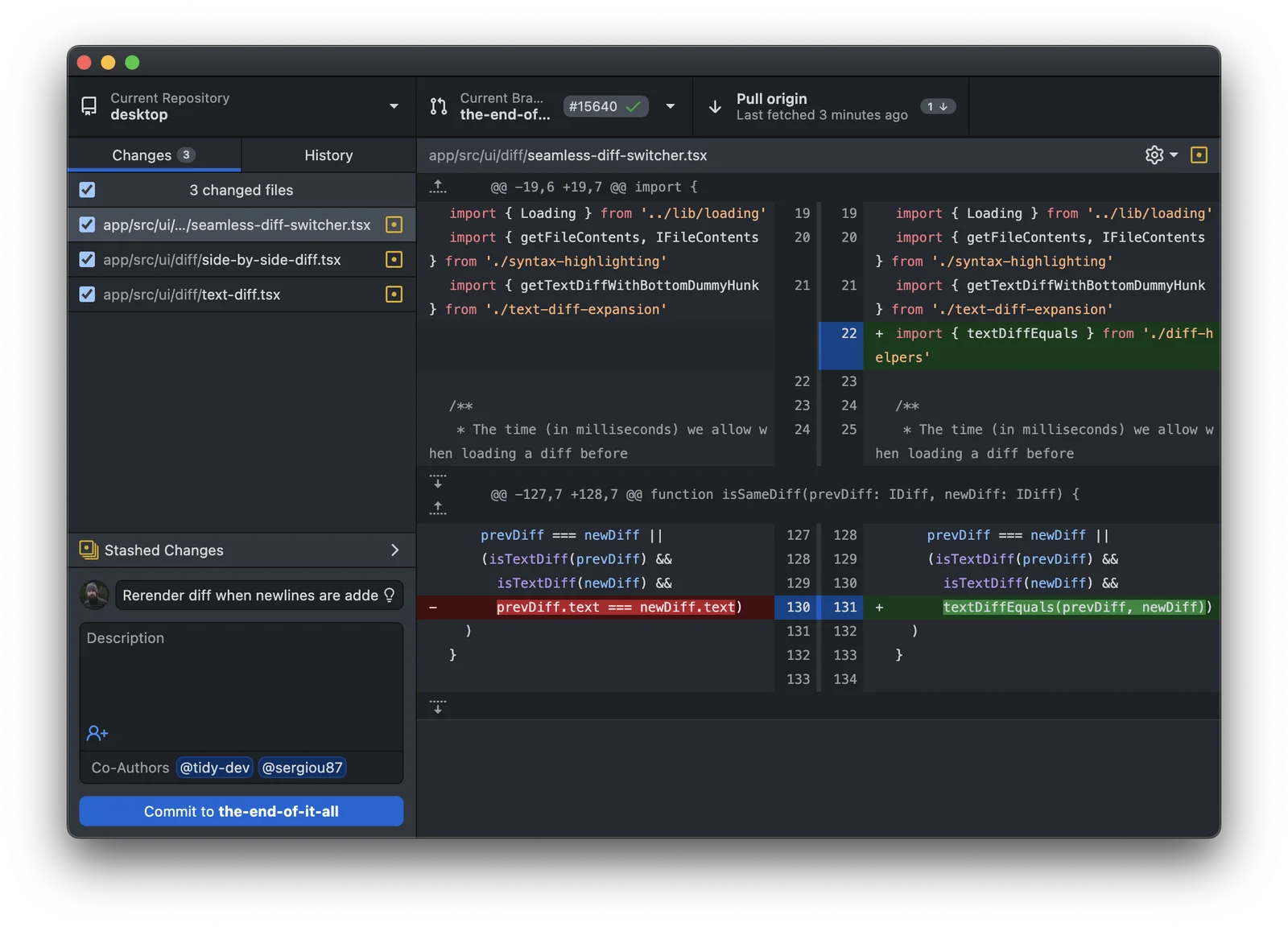
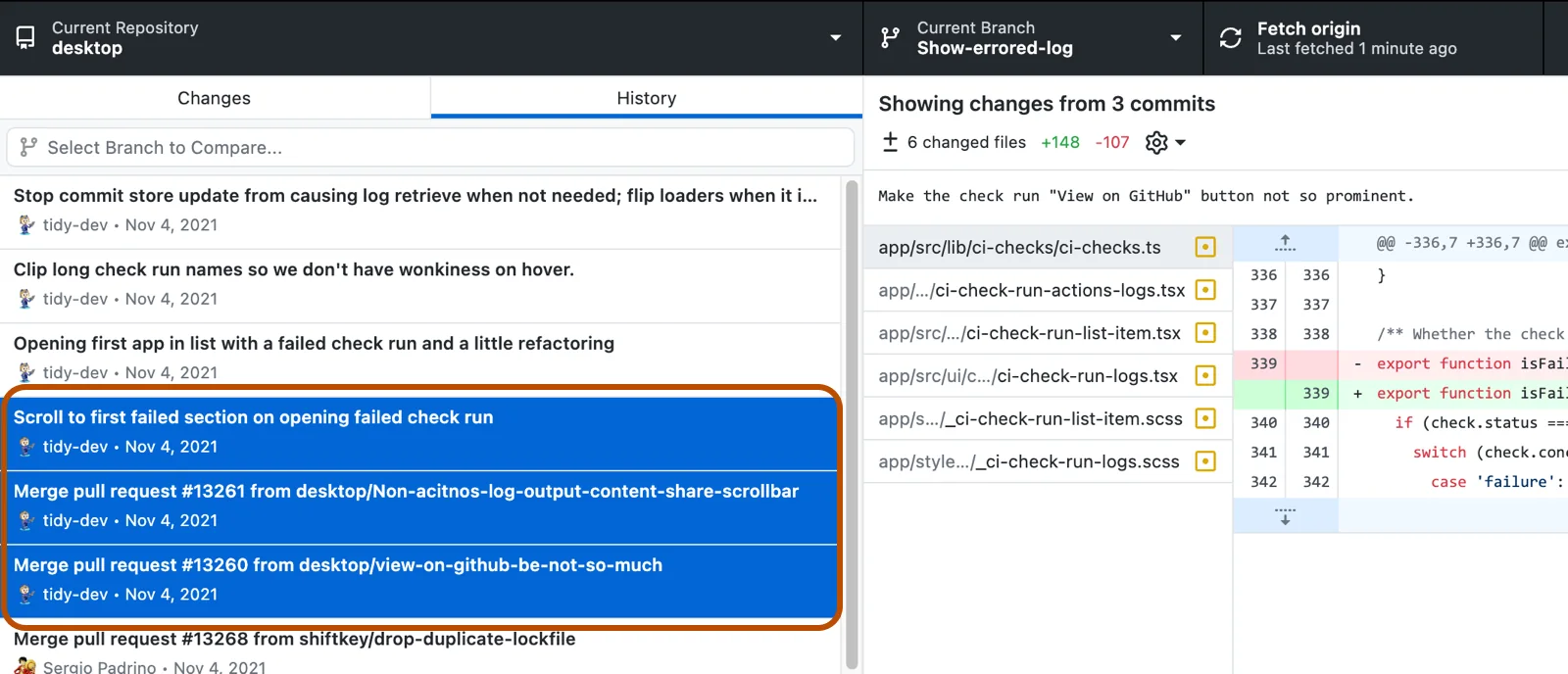
Branch functions cover common operations such as creation, switching, renaming, merging and deleting. The historical records list the author of the submission, the time, the message and the content of the change, and also allow for the choice of successive multiple submissions to view the differences together. When submission is required, the software also provides access to the base, compression and consolidation, preferred and original submissions.
Remote repository synchronises through Fetch origin, Pull origin and Push origin. When new submissions appear on GitHub, pull first. Conflicts need to be resolved by themselves. In preparation for collaboration, the user can initiate requests from the current branch and can submit the project to an external editor or command line for further processing.
The most valuable part of this software is to keep Git on the screen. The documents that have changed, the lines that will enter the submission, the branch in which they are currently located, and whether they have not yet been sent are clearly located. For beginners, it is easier to construct concepts than to look at only short tips in a terminal.
The collaborative process between GitHub Desktop and GitHub is very tight. Cloning, birthing, distribution of branches and creation of pull requests can follow and users of GitHub Enterprise have separate access points. It also manages the local Git repository, although when remote services are involved, the authority, branch protection and organizational rules are determined by the corresponding server.
Software focuses on common workflows and does not cover every advanced parameter of Git. Complex historical restoration, batch script operation, submodule maintenance or special server configuration may eventually return to the command line. It also has no official Linux client. The official repository refers to the construction of Linux, which is maintained by the community, and which is not part of GitHub ‘ s official support and is not listed here as a secure download entry.
Users who are starting to study Git can use it to complete the first repository, branch and submission, and graphic differences can help to understand the relationship between temporary storage and submission. When maintaining an individual open source item, you can switch between the editor and GitHub Desktop to reduce duplicate input commands. Those involved in the team project can check for differences before pushing branches and initiating pull requests.
It is also appropriate for occasional change of document, configuration or part-time developers of website content. This type of user uses Git less frequently and commands are easy to forget, and a graphical interface can keep a visible operating path. Those who need to work on Linux, often rewrite complex history or a large number of automated Git operations, typically order line clients to be more appropriate.
The GitHub Desktop software itself can be downloaded and installed free of charge without advertising. The application of the source code in the official repository is subject to a MIT licence, which allows for its use, modification and re-issuance. GitHub names, logos and other brand names are also subject to trademark rules, and MIT licences do not amount to access to these trademarks.
No software licence fees are charged for managing local repositorys. When connecting GitHub.com, GitHub Enterprise or optional online functions, the account amount, organizational strategy and fee-paying services are calculated according to the respective product scheme. Ordinary users only work in basic repository management and open project collaboration, using GitHub ‘ s free account first.
GitHub Desktop clearly arranges the most common Git action. Viewing differences, selecting submissions, switching branches and synchronizing remote repositorys can be done in one window. It is appropriate for those who focus on what the document has changed, and for those who are new to set the norm.
Git still has a threshold. There are rules for branches, remote repositorys, pull requests and conflict processing, and the graphic button does not judge which part of the code should be retained for the user. The current interface is mainly in English, and official Chinese documents solve most process problems. Practice from the test repository, familiarization before processing important items.
In cases involving the deletion of branches, forced push, base or compressed consolidation, the remote status should be confirmed and the recoverable branch retained. Do not directly run an unknown script or installation after downloading the repository. GitHub Desktop is responsible for the version control and cannot judge whether the project code is safe.
The current stable version, 3.6.4, was published on 13 August 2026. Windows x 64 Official installation procedure approximately 293.21 MiB. No new interface function this time. Updates upgrades the built-in Git for Windows to 2.53.windows.4 and the Git Crystal Manager to 2.9.0, mainly to improve the Windows end version control and proof components.
The official repository was not archived and the code was still updated on 21 August 2026. 3.6.4 Windows x64 installation procedures, machine-grade MSI and verification documents are available on the official issue page. Ordinary users can download it from the official network and open the official distribution page when they want to check the version and the list of documents.